Icon of program: Key Remapper

Key Remapper for Windows

  • Trial version
  • 3.3
    77
  • 139.4K
  • V1.13-build-480
Download for Windows

View an ad to download for free

Xavier Slim

Updated 3 months ago

Key remapping tool for mouse and keyboard

Key Remapper is a premium utility application for PC from developer ATNSOFT. It is a mouse control and key mapping utility that allows users to change their buttons and scroll wheel functions easily. It can work with various hardware configurations and can be set up to do various actions as needed.

Top Recommended Alternative

Compared to other key mapper programs like SharpKeys or KeyTweak, Key Remapper stands out for being a tool specifically made for mouse peripherals. Newcomers can check out a free trial version, after which they can opt for one of the various license options depending on the number of users.

Rewriting how your keyboard works 

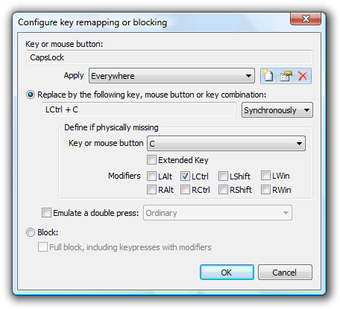
As a remapping tool, Key Remapper is built around flexibility. You can assign one key to another, create multi-key combinations, or trigger specific actions such as launching applications or inserting text. This creates a custom input system that adapts to different needs, from productivity setups to gaming configurations. The process is straightforward. Select a key, assign a new function, and apply the changes. Once active, the remapped keys behave as if they were built that way. 

It can improve workflow efficiency by reducing repetitive actions, allowing users to automate small tasks directly from their keyboard. This is particularly useful for tasks like coding, editing, or managing applications. It also works well for accessibility, helping users adjust controls to suit their preferences. However, because it operates at a system level, changes affect overall input behavior, which can require careful setup. This gives it a system-wide impact, where small adjustments can influence multiple applications. 

Making things smoother and compatible 

Key Remapper’s updates have centered on improving compatibility with newer versions of Windows and refining how key mappings are handled across different applications. Enhancements to system integration ensure that remapped keys behave consistently, even in complex environments like games or specialized software. Updates also include fixes for input conflicts and improvements to how profiles are saved and applied. These changes reflect a compatibility-focused refinement, ensuring that the tool remains reliable without changing its core functionality. 

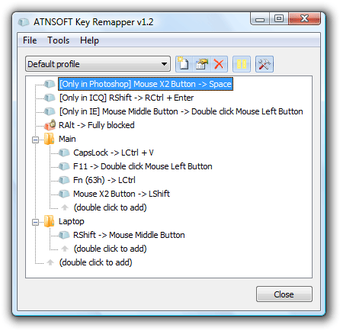
The user-interface supports this workflow with a structured interface that lists current mappings and allows quick edits. Everything is presented in a way that keeps track of changes without confusion. The experience remains centered on clarity and control, creating a focused control interface that helps users manage their keyboard efficiently. At the same time, the depth of options can feel slightly complex at first, especially for users unfamiliar with key mapping concepts.

A powerful remapping tool that rewards careful setup 

Key Remapper stands out as a flexible utility for users who want more control over how their keyboard and mouse behave across everyday tasks. Its system-wide remapping, profile support, and workflow-focused customization make it genuinely useful for productivity, accessibility, and specialized setups. However, that same depth can make the tool feel a little intimidating at first, and careless changes may affect input behavior. 

Xavier Slim

Xavier Slim has experience in English writing supported by academic recognition and creative competitions. He has worked on tutoring and editorial projects, developing content that balances clarity with creativity. His interests in writing and technology inform his practical approach to reviewing digital tools.

  • Pros

    • Highly flexible key and mouse remapping
    • Useful for productivity and accessibility
    • Supports custom actions and multi-key combinations
    • Works across different applications
    • Profiles help manage different setups
  • Cons

    • Premium software
    • Can feel complex for beginners
    • System-wide changes require careful setup
    • Misconfigured mappings may affect overall input behavior
 0/4

App specs

  • Developer

  • License

    Trial version

  • Version

    1.13-build-480
  • Latest update

  • Platform

    Windows

  • OS

    Windows 2000

  • Language

    English

    Available languages

    • English
    • Spanish
    • French
    • Italian
    • Japanese
    • Dutch
    • Russian
  • Downloads

    139.4K

    Last month's downloads

    • 1.4K
  • Size

    1.81 MB

Program available in other languages


Icon of program: Key Remapper

Key Remapper for PC

  • Trial version
  • 3.3
    77
  • 139.4K
  • V1.13-build-480
Download for PC

View an ad to download for free


User reviews about Key Remapper

3.3

3 reviews

Add review

Main reviews for you

  • Anonymous user

    Ok so i have this problem after the trial ran out it is still remapping my key so i cant use my left control help me

  • Anonymous user

    Troubleshooting. After Windows 10 1 year anniversary updates (other something past updates), this tool is not work in my computer.I was moved the sentence on CurrentUser part to LocalMachine part. And it works again. Maybe windows makes some bugs in using user setting.

  • Anonymous user

    Most Amazing Thing To Happen To Computers! (For Me At least). So my Escape key has been broken for about a year now, I am on a gaming computer, and without out, life is very, very frustrating! I go through all these big Key Remapping Software's and none of them work...Then I come across this, I think, if this works, I will scream in joy.Guess What?I screamed in joy.

More

You may also like

Alternatives to Key Remapper

Explore Apps

Latest articles

Laws concerning the use of this software vary from country to country. We do not encourage or condone the use of this program if it is in violation of these laws.
Softonic

Is Key Remapper safe?

100/100

Score result: Clean

This file passed a comprehensive security scan using VirusTotal technology. It is safe to download.

  • Virus free
  • Spyware free
  • Malware free
  • Verified by Security Partners

    VirusTotal logo

Scan Info

Last scan
Saturday, January 28, 2023
Scan provider
VirusTotal · Full report

File Integrity

File
keyremapper_setup.exe
SHA256
10284a7b6318b32b1a7c400170c99333c215c28b802382b0d11d4676da6759b9
SHA1
c577c20f749b536d570d631985601dd6fbe2e92f

Softonic security commitment

Key Remapper has been thoroughly scanned by our advanced security systems and verified by industry-leading partners. This file comes from the official developer and has passed all our security checks, showing no signs of viruses, malware, or spyware. For more information, visit our Security and Trust Center

Signed in to Softonic as